| .ci | ||
| .github/workflows | ||
| comfy | ||
| comfy_extras | ||
| custom_nodes | ||
| input | ||
| models | ||
| notebooks | ||
| output | ||
| script_examples | ||
| tests | ||
| tests-ui | ||
| __init__.py | ||
| .gitignore | ||
| CODEOWNERS | ||
| comfyui_screenshot.png | ||
| extra_model_paths.yaml.example | ||
| LICENSE | ||
| main.py | ||
| MANIFEST.in | ||
| mypy.ini | ||
| pyproject.toml | ||
| pytest.ini | ||
| README.md | ||
| requirements-dev.txt | ||
| requirements.txt | ||
| setup.py | ||


ComfyUI
The most powerful and modular stable diffusion GUI and backend.
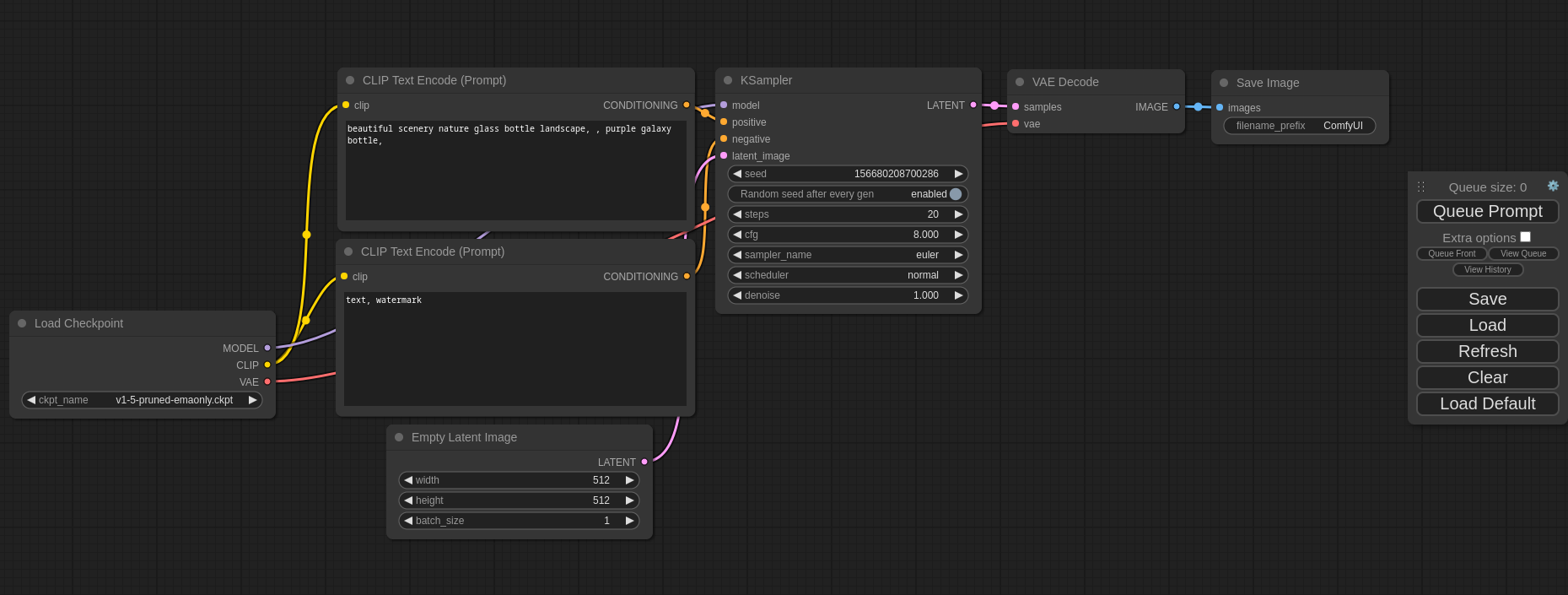
This ui will let you design and execute advanced stable diffusion pipelines using a graph/nodes/flowchart based interface. For some workflow examples and see what ComfyUI can do you can check out:
ComfyUI Examples
Installing ComfyUI
Features
- Nodes/graph/flowchart interface to experiment and create complex Stable Diffusion workflows without needing to code anything.
- Fully supports SD1.x, SD2.x, SDXL and Stable Video Diffusion
- Asynchronous Queue system
- Many optimizations: Only re-executes the parts of the workflow that changes between executions.
- Command line option:
--lowvramto make it work on GPUs with less than 3GB vram (enabled automatically on GPUs with low vram) - Works even if you don't have a GPU with:
--cpu(slow) - Can load ckpt, safetensors and diffusers models/checkpoints. Standalone VAEs and CLIP models.
- Embeddings/Textual inversion
- Loras (regular, locon and loha)
- Hypernetworks
- Loading full workflows (with seeds) from generated PNG files.
- Saving/Loading workflows as Json files.
- Nodes interface can be used to create complex workflows like one for Hires fix or much more advanced ones.
- Area Composition
- Inpainting with both regular and inpainting models.
- ControlNet and T2I-Adapter
- Upscale Models (ESRGAN, ESRGAN variants, SwinIR, Swin2SR, etc...)
- unCLIP Models
- GLIGEN
- Model Merging
- LCM models and Loras
- SDXL Turbo
- Latent previews with TAESD
- Starts up very fast.
- Works fully offline: will never download anything.
- Config file to set the search paths for models.
Workflow examples can be found on the Examples page
Shortcuts
| Keybind | Explanation |
|---|---|
| Ctrl + Enter | Queue up current graph for generation |
| Ctrl + Shift + Enter | Queue up current graph as first for generation |
| Ctrl + Z/Ctrl + Y | Undo/Redo |
| Ctrl + S | Save workflow |
| Ctrl + O | Load workflow |
| Ctrl + A | Select all nodes |
| Alt + C | Collapse/uncollapse selected nodes |
| Ctrl + M | Mute/unmute selected nodes |
| Ctrl + B | Bypass selected nodes (acts like the node was removed from the graph and the wires reconnected through) |
| Delete/Backspace | Delete selected nodes |
| Ctrl + Delete/Backspace | Delete the current graph |
| Space | Move the canvas around when held and moving the cursor |
| Ctrl/Shift + Click | Add clicked node to selection |
| Ctrl + C/Ctrl + V | Copy and paste selected nodes (without maintaining connections to outputs of unselected nodes) |
| Ctrl + C/Ctrl + Shift + V | Copy and paste selected nodes (maintaining connections from outputs of unselected nodes to inputs of pasted nodes) |
| Shift + Drag | Move multiple selected nodes at the same time |
| Ctrl + D | Load default graph |
| Q | Toggle visibility of the queue |
| H | Toggle visibility of history |
| R | Refresh graph |
| Double-Click LMB | Open node quick search palette |
Ctrl can also be replaced with Cmd instead for macOS users
Installing
Windows
Standalone
There is a portable standalone build for Windows that should work for running on Nvidia GPUs or for running on your CPU only on the releases page.
Direct link to download
Simply download, extract with 7-Zip and run. Make sure you put your Stable Diffusion checkpoints/models (the huge ckpt/safetensors files) in: ComfyUI\models\checkpoints
If you have trouble extracting it, right click the file -> properties -> unblock
How do I share models between another UI and ComfyUI?
See the Config file to set the search paths for models. In the standalone windows build you can find this file in the ComfyUI directory. Rename this file to extra_model_paths.yaml and edit it with your favorite text editor.
Jupyter Notebook
To run it on services like paperspace, kaggle or colab you can use my Jupyter Notebook
Manual Install (Windows, Linux, macOS)
You must have Python 3.11 or 3.10 installed. 3.12 is not yet supported. On Windows, download the latest Python from their website. You can also directly download 3.11.4 here..
On macOS, install exactly Python 3.11 using brew, which you can download from https://brew.sh, using this command: brew install python@3.11. Do not use 3.9 or older, and do not use 3.12 or newer. Its compatibility with Stable Diffusion in both directions is broken.
-
Create a virtual environment:
python -m virtualenv venv -
Activate it on Windows (PowerShell):
Set-ExecutionPolicy Unrestricted -Scope Process
& .\venv\Scripts\activate.ps1
Linux and macOS
source ./venv/bin/activate -
Then, run the following command to install
comfyuiinto your current environment. This will correctly select the version of pytorch that matches the GPU on your machine (NVIDIA or CPU on Windows, NVIDIA AMD or CPU on Linux):pip install git+https://github.com/hiddenswitch/ComfyUI.git -
To run the web server:
comfyuiTo generate python OpenAPI models:
comfyui-openapi-gen
Manual Install (Windows, Linux, macOS) For Development
-
Clone this repo:
git clone https://github.com/comfyanonymous/ComfyUI.git cd ComfyUI -
Put your Stable Diffusion checkpoints (the huge ckpt/safetensors files) into the
models/checkpointsfolder. You can download SD v1.5 using the following command:curl -L https://huggingface.co/runwayml/stable-diffusion-v1-5/resolve/main/v1-5-pruned-emaonly.ckpt -o ./models/checkpoints/v1-5-pruned-emaonly.ckpt -
Put your VAE into the
models/vaefolder. -
(Optional) Create a virtual environment:
-
Create an environment:
python -m virtualenv venv -
Activate it:
Windows (PowerShell):
Set-ExecutionPolicy Unrestricted -Scope Process
& .\venv\Scripts\activate.ps1
Linux and macOS
source ./venv/bin/activate
-
-
Then, run the following command to install
comfyuiinto your current environment. This will correctly select the version of pytorch that matches the GPU on your machine (NVIDIA or CPU on Windows, NVIDIA AMD or CPU on Linux):pip install -e .[dev] -
To run the web server:
comfyuiTo generate python OpenAPI models:
comfyui-openapi-genTo run tests:
pytest tests/inference
(cd tests-ui && npm ci && npm run test:generate && npm test)
You can use
comfyuias an API. Visit the OpenAPI specification. This file can be used to generate typed clients for your preferred language.
Authoring Custom Nodes
Create a requirements.txt:
comfyui
Observe comfyui is now a requirement for using your custom nodes. This will ensure you will be able to access comfyui as a library. For example, your code will now be able to import the folder paths using from comfyui.cmd import folder_paths. Because you will be using my fork, use this:
comfyui @ git+https://github.com/hiddenswitch/ComfyUI.git
Additionally, create a pyproject.toml:
[build-system]
requires = ["setuptools", "wheel", "pip"]
build-backend = "setuptools.build_meta"
This ensures you will be compatible with later versions of Python.
Finally, move your nodes to a directory with an empty __init__.py, i.e., a package. You should have a file structure like this:
# the root of your git repository
/.git
/pyproject.toml
/requirements.txt
/mypackage_custom_nodes/__init__.py
/mypackage_custom_nodes/some_nodes.py
Finally, create a setup.py at the root of your custom nodes package / repository. Here is an example:
setup.py
from setuptools import setup, find_packages
import os.path

setup(
    name="mypackage",
    version="0.0.1",
    packages=find_packages(),
    install_requires=open(os.path.join(os.path.dirname(__file__), "requirements.txt")).readlines(),
    author='',
    author_email='',
    description='',
    entry_points={
        'comfyui.custom_nodes': [
            'mypackage = mypackage_custom_nodes',
        ],
    },
)
All .py files located in the package specified by the entrypoint with your package's name will be scanned for node class mappings declared like this:
NODE_CLASS_MAPPINGS = {
    "BinaryPreprocessor": Binary_Preprocessor
}
NODE_DISPLAY_NAME_MAPPINGS = {
    "BinaryPreprocessor": "Binary Lines"
}
These packages will be scanned recursively.
Since you will be using pip to install custom nodes this way, you will get dependency resolution automatically, so you never have to pip install -r requirements.txt or similar garbage. this will deprecate / obsolete ComfyUI-Manager's functionality, you can use any pip package manager UI (mostly resolves https://github.com/comfyanonymous/ComfyUI/issues/1773). this also fixes issues like https://github.com/comfyanonymous/ComfyUI/issues/1678 https://github.com/comfyanonymous/ComfyUI/issues/1665 https://github.com/comfyanonymous/ComfyUI/issues/1596 https://github.com/comfyanonymous/ComfyUI/issues/1385 https://github.com/comfyanonymous/ComfyUI/issues/1373.
You would also be able to add the comfyui git hash and custom nodes packages by git+commit or name in the metadata for maximum reproducibility.
Troubleshooting
I see a message like
RuntimeError: '"upsample_bilinear2d_channels_last" not implemented for 'Half''
You must use Python 3.10 or 3.11 on macOS devices, and update to at least Ventura.
I see a message like
Error while deserializing header: HeaderTooLarge
Download your model file again.
Others:
Intel Arc
Note
: Remember to add your models, VAE, LoRAs etc. to the corresponding Comfy folders, as discussed in ComfyUI manual installation.
DirectML (AMD Cards on Windows)
Follow the manual installation steps. Then:
pip uninstall torch torchvision torchaudio
pip install torch torchvision torchaudio
pip install torch-directml
Launch ComfyUI with: comfyui --directml
I already have another UI for Stable Diffusion installed do I really have to install all of these dependencies?
You don't. If you have another UI installed and working with its own python venv you can use that venv to run ComfyUI. You can open up your favorite terminal and activate it:
source path_to_other_sd_gui/venv/bin/activate
or on Windows:
With Powershell: "path_to_other_sd_gui\venv\Scripts\Activate.ps1"
With cmd.exe: "path_to_other_sd_gui\venv\Scripts\activate.bat"
And then you can use that terminal to run ComfyUI without installing any dependencies. Note that the venv folder might be called something else depending on the SD UI.
Running
comfyui
For AMD cards not officially supported by ROCm
Try running it with this command if you have issues:
For 6700, 6600 and maybe other RDNA2 or older: HSA_OVERRIDE_GFX_VERSION=10.3.0 comfyui
For AMD 7600 and maybe other RDNA3 cards: HSA_OVERRIDE_GFX_VERSION=11.0.0 comfyui
Notes
Only parts of the graph that have an output with all the correct inputs will be executed.
Only parts of the graph that change from each execution to the next will be executed, if you submit the same graph twice only the first will be executed. If you change the last part of the graph only the part you changed and the part that depends on it will be executed.
Dragging a generated png on the webpage or loading one will give you the full workflow including seeds that were used to create it.
You can use () to change emphasis of a word or phrase like: (good code:1.2) or (bad code:0.8). The default emphasis for () is 1.1. To use () characters in your actual prompt escape them like \( or \).
You can use {day|night}, for wildcard/dynamic prompts. With this syntax "{wild|card|test}" will be randomly replaced by either "wild", "card" or "test" by the frontend every time you queue the prompt. To use {} characters in your actual prompt escape them like: \{ or \}.
Dynamic prompts also support C-style comments, like // comment or /* comment */.
To use a textual inversion concepts/embeddings in a text prompt put them in the models/embeddings directory and use them in the CLIPTextEncode node like this (you can omit the .pt extension):
embedding:embedding_filename.pt
How to increase generation speed?
Make sure you use the regular loaders/Load Checkpoint node to load checkpoints. It will auto pick the right settings depending on your GPU.
You can set this command line setting to disable the upcasting to fp32 in some cross attention operations which will increase your speed. Note that this will very likely give you black images on SD2.x models. If you use xformers or pytorch attention this option does not do anything.
--dont-upcast-attention
How to show high-quality previews?
Use --preview-method auto to enable previews.
The default installation includes a fast latent preview method that's low-resolution. To enable higher-quality previews with TAESD, download the taesd_decoder.pth (for SD1.x and SD2.x) and taesdxl_decoder.pth (for SDXL) models and place them in the models/vae_approx folder. Once they're installed, restart ComfyUI to enable high-quality previews.
Support and dev channel
Matrix space: #comfyui_space:matrix.org (it's like discord but open source).
QA
Why did you make this?
I wanted to learn how Stable Diffusion worked in detail. I also wanted something clean and powerful that would let me experiment with SD without restrictions.
Who is this for?
This is for anyone that wants to make complex workflows with SD or that wants to learn more how SD works. The interface follows closely how SD works and the code should be much more simple to understand than other SD UIs.