| .ci | ||
| .github/workflows | ||
| comfy | ||
| comfy_extras | ||
| custom_nodes | ||
| input | ||
| models | ||
| notebooks | ||
| output | ||
| script_examples | ||
| web | ||
| .gitignore | ||
| comfyui_screenshot.png | ||
| execution.py | ||
| extra_model_paths.yaml.example | ||
| folder_paths.py | ||
| LICENSE | ||
| main.py | ||
| nodes.py | ||
| README.md | ||
| requirements.txt | ||
| server.py | ||
| setup.py | ||


ComfyUI
A powerful and modular stable diffusion GUI.
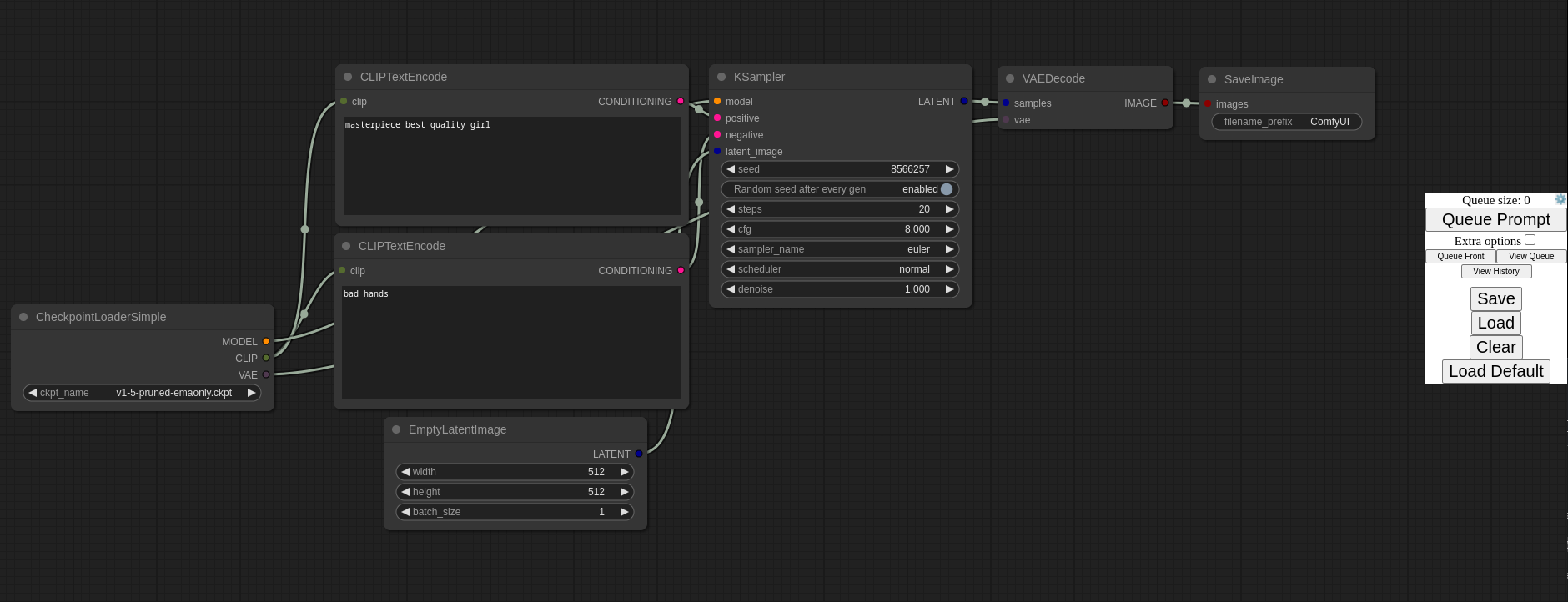
This ui will let you design and execute advanced stable diffusion pipelines using a graph/nodes/flowchart based interface. For some workflow examples and see what ComfyUI can do you can check out:
ComfyUI Examples
Features
- Nodes/graph/flowchart interface to experiment and create complex Stable Diffusion workflows without needing to code anything.
- Fully supports SD1.x and SD2.x
- Asynchronous Queue system
- Many optimizations: Only re-executes the parts of the workflow that changes between executions.
- Command line option:
--lowvramto make it work on GPUs with less than 3GB vram (enabled automatically on GPUs with low vram) - Works even if you don't have a GPU with:
--cpu(slow) - Can load both ckpt and safetensors models/checkpoints. Standalone VAEs and CLIP models.
- Embeddings/Textual inversion
- Loras (regular, locon and loha)
- Loading full workflows (with seeds) from generated PNG files.
- Saving/Loading workflows as Json files.
- Nodes interface can be used to create complex workflows like one for Hires fix or much more advanced ones.
- Area Composition
- Inpainting with both regular and inpainting models.
- ControlNet and T2I-Adapter
- Upscale Models (ESRGAN, ESRGAN variants, SwinIR, Swin2SR, etc...)
- Starts up very fast.
- Works fully offline: will never download anything.
- Config file to set the search paths for models.
Workflow examples can be found on the Examples page
Shortcuts
- Ctrl + A select all nodes
- Ctrl + M mute/unmute selected nodes
- Delete or Backspace delete selected nodes
Installing
Windows
There is a portable standalone build for Windows that should work for running on Nvidia GPUs or for running on your CPU only on the releases page.
Direct link to download
Just download, extract and run. Make sure you put your Stable Diffusion checkpoints/models (the huge ckpt/safetensors files) in: ComfyUI\models\checkpoints
Colab Notebook
To run it on colab or paperspace you can use my Colab Notebook here: Link to open with google colab
Manual Install (Windows, Linuxm, macOS)
- Clone this repo:
git clone https://github.com/comfyanonymous/ComfyUI.git
cd ComfyUI
- Put your Stable Diffusion checkpoints (the huge ckpt/safetensors files) into the
models/checkpointsfolder. You can download SD v1.5 using the following command:
curl -L https://huggingface.co/runwayml/stable-diffusion-v1-5/resolve/main/v1-5-pruned-emaonly.ckpt -o ./models/checkpoints/v1-5-pruned-emaonly.ckpt
-
Put your VAE into the
models/vaefolder. -
(Optional) Create a virtual environment:
- Create an environment:
python -m virtualenv venv
- Activate it:
Windows:
Set-ExecutionPolicy Unrestricted -Scope Process
& .\venv\Scripts\activate.ps1
Linux, macOS and bash/busybox64.exe on Windows:
source ./venv/bin/activate
- Then, run the following command to install
comfyuiinto your current environment. This will correctly select the version of pytorch that matches the GPU on your machine (NVIDIA or CPU on Windows, NVIDIA AMD or CPU on Linux):
pip install -e .
Troubleshooting
If you get the "Torch not compiled with CUDA enabled" error, uninstall torch with:
pip uninstall torch
And install it again with the command above.
I already have another UI for Stable Diffusion installed do I really have to install all of these dependencies?
You don't. If you have another UI installed and working with it's own python venv you can use that venv to run ComfyUI. You can open up your favorite terminal and activate it:
source path_to_other_sd_gui/venv/bin/activate
or on Windows:
With Powershell: "path_to_other_sd_gui\venv\Scripts\Activate.ps1"
With cmd.exe: "path_to_other_sd_gui\venv\Scripts\activate.bat"
And then you can use that terminal to run Comfyui without installing any dependencies. Note that the venv folder might be called something else depending on the SD UI.
Running
python main.py
For AMD 6700, 6600 and maybe others
Try running it with this command if you have issues:
HSA_OVERRIDE_GFX_VERSION=10.3.0 python main.py
Notes
Only parts of the graph that have an output with all the correct inputs will be executed.
Only parts of the graph that change from each execution to the next will be executed, if you submit the same graph twice only the first will be executed. If you change the last part of the graph only the part you changed and the part that depends on it will be executed.
Dragging a generated png on the webpage or loading one will give you the full workflow including seeds that were used to create it.
You can use () to change emphasis of a word or phrase like: (good code:1.2) or (bad code:0.8). The default emphasis for () is 1.1. To use () characters in your actual prompt escape them like \( or \).
You can use {day|night}, for wildcard/dynamic prompts. With this syntax "{wild|card|test}" will be randomly replaced by either "wild", "card" or "test" by the frontend every time you queue the prompt. To use {} characters in your actual prompt escape them like: \{ or \}.
To use a textual inversion concepts/embeddings in a text prompt put them in the models/embeddings directory and use them in the CLIPTextEncode node like this (you can omit the .pt extension):
embedding:embedding_filename.pt
Fedora
To get python 3.10 on fedora:
dnf install python3.10
Then you can:
python3.10 -m ensurepip
This will let you use: pip3.10 to install all the dependencies.
How to increase generation speed?
Make sure you use the CheckpointLoaderSimple node to load checkpoints. It will auto pick the right settings depending on your GPU.
You can set this command line setting to disable the upcasting to fp32 in some cross attention operations which will increase your speed. Note that this doesn't do anything when xformers is enabled and will very likely give you black images on SD2.x models.
--dont-upcast-attention
Support and dev channel
Matrix space: #comfyui_space:matrix.org (it's like discord but open source).
QA
Why did you make this?
I wanted to learn how Stable Diffusion worked in detail. I also wanted something clean and powerful that would let me experiment with SD without restrictions.
Who is this for?
This is for anyone that wants to make complex workflows with SD or that wants to learn more how SD works. The interface follows closely how SD works and the code should be much more simple to understand than other SD UIs.